Stop Building AI Agents — Watch This First (The 2026 Reality Check)
Everyone is shipping 'AI agents' in 2026. Most of them shouldn't be. Before you write a single tool call, here's the framework that separates real agents from expensive chatbots — and the four mistakes that quietly kill 90% of agent projects.
If you opened Twitter this morning, you saw a dozen people announcing their new "AI agent." If you opened your Slack, your manager probably forwarded one of those threads. And if you opened your codebase, there is a non-zero chance you have an `agent.ts` file in there that you suspect — but won't say out loud — is just a chatbot in a trench coat.
I've spent the last year building, breaking, reviewing, and shipping AI agents in production. I've also seen more agent projects die than I can count. This article is the conversation I wish someone had with me before I wrote my first agent loop. It pairs with my video walkthrough above — watch that for the live demos and the wreckage; read this for the framework.
The 2026 problem: "agent" stopped meaning anything
In 2024, an agent meant something specific: an LLM in a loop, calling tools, deciding what to do next, with autonomy over its own steps. In 2026, "agent" means whatever the marketing slide needs it to mean. A workflow with two LLM calls? Agent. A chatbot with one tool? Agent. A cron job that summarizes Slack? Agent.
This linguistic collapse is not harmless. It's why so many "agent" projects ship late, cost 4× the estimate, and quietly get rolled back to a Zapier flow six months later. You can't architect what you can't name. So before you write a line of code, get specific about what you're actually building.
The honest taxonomy: workflow, assistant, agent
Three things get called "agents" in the wild. Only one of them actually is. Pick the right label and 80% of your architecture decisions get made for you.
- Workflow — A fixed sequence of LLM calls and tool calls. The path is hard-coded; the model just fills in the blanks. This is what most "agents" actually are. Cheap, predictable, easy to debug. If you can draw the flowchart in advance, it's a workflow.
- Assistant — A single LLM with a tool belt that responds to one user turn at a time. It chooses tools, but doesn't loop on itself. ChatGPT with web search is an assistant. Reliable, but bounded by what fits in one decision.
- Agent — An LLM that runs in a loop, decides its own next step, can call tools repeatedly, and stops when it judges the goal is met. Open-ended. Expensive. Genuinely autonomous. Powerful when the path can't be known in advance — dangerous when it can.
“If you can draw the flowchart on a whiteboard before writing the code, you do not need an agent. You need a workflow.”
— The first thing I tell every team kicking off an "agent" project
The four mistakes that kill 90% of agent projects
I've reviewed enough postmortems to spot the pattern. When agent projects fail in 2026, they almost always fail in one of four predictable ways. Print this list. Tape it above your monitor.
1. Building an agent when a workflow would do
This is the silent killer. Teams pick "agent" because it sounds modern, then spend three months fighting non-determinism, prompt drift, and runaway token bills — solving problems they created by choosing the wrong abstraction. The fix is brutal but free: ask "could I write this as a numbered list of steps?" If yes, it's a workflow. Workflows are not a downgrade. They're the right tool.
2. Giving the agent too many tools
More tools does not mean more capable. Past about 8–12 tools, even frontier models start picking the wrong one, hallucinating tool names, or chaining calls that make no sense. The fix: ruthlessly group tools by intent. "Send notification" is one tool with a channel parameter — not three tools for Slack, email, and SMS. Your agent's prompt context is finite; spend it on the goal, not the menu.
3. No stopping condition you can defend
An agent without a clear stop is a runaway. "Stop when the task is done" sounds fine in a design doc and falls apart in production at 3 AM when the model loops forever on an ambiguous request. Define stops in three forms: a success condition the model can detect, a step budget you enforce, and a token budget that kills the run. Ship all three. Test the kill switches before you trust the success path.
4. No observability into the loop
If you can't replay an agent's reasoning step by step — what it saw, what it decided, what tool it called, what came back — you don't have a system, you have a séance. Log every step. Store the full message history. Tag runs with a trace ID. The teams that ship agents successfully spend more time on observability than on the loop itself, and they ship faster because of it.
The decision framework: should you actually build an agent?
Before you commit, answer these five questions honestly. If you can't say "yes" to all five, build a workflow or an assistant instead. You'll ship faster, spend less, and your future self will thank you.
- Is the path genuinely unknown in advance? If you can enumerate the steps, you don't need an agent.
- Does the task require more than one decision-and-action cycle? Single-shot problems belong to assistants, not agents.
- Can you afford the variance? Agents are non-deterministic. If 5% wrong answers tank the product, this is the wrong shape.
- Do you have an evaluation harness? If you can't measure quality on a held-out set of tasks, you can't iterate — you're just hoping.
- Will the agent run on humans-in-the-loop or fully autonomously? Autonomous agents need a stricter stopping story, more observability, and more guardrails. Be honest about which one you're shipping.
What to build instead (most of the time)
Here's the unsexy truth: in 2026, the highest-leverage AI features are not agents. They're well-prompted, well-evaluated workflows with one or two LLM calls in well-chosen places. They ship in two weeks instead of two quarters. They cost cents instead of dollars per run. They wake nobody up at 3 AM.
Save the agent shape for the problems that actually need it: open-ended research, multi-step debugging, code generation that requires running the code and reacting, complex form-filling across systems where the next step depends on the last response. For everything else, the boring answer is the right answer.
If you do build an agent: the 2026 SDK landscape
Once you've genuinely earned the right to build an agent, the next decision is which SDK to build it on. In 2026, every major cloud has shipped its own agent framework — and the choice is no longer about "which one is best," because they've all converged on tool-use, MCP, and multi-agent handoffs. The choice is about which cloud you're already in, which certification path your team is investing in, and how much of the framework you actually want to own.
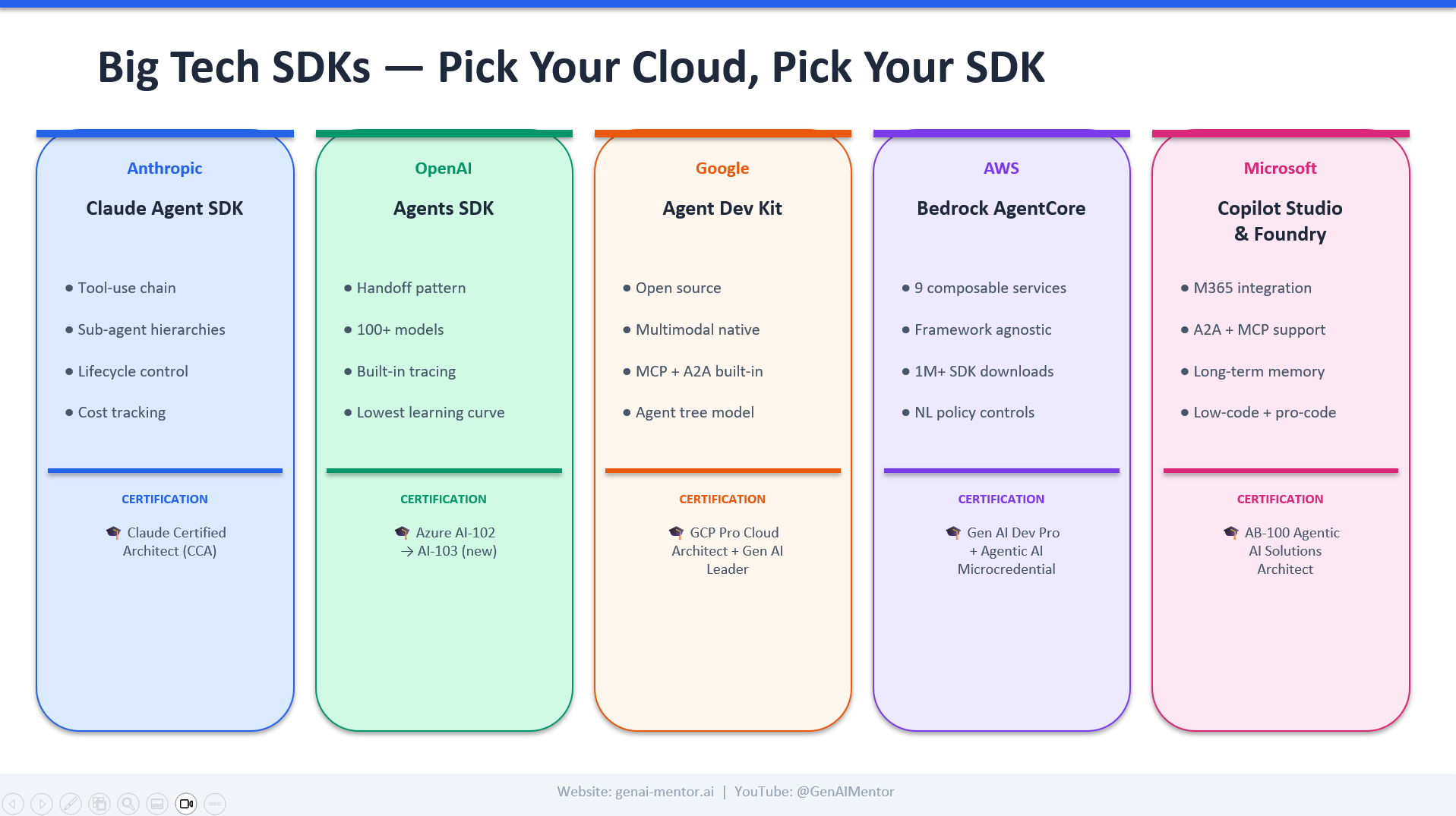
A quick read of the field: Anthropic's Claude Agent SDK leads on tool-use chains and sub-agent hierarchies — the right pick if your edge is reasoning quality and you want fine-grained lifecycle control. OpenAI's Agents SDK has the lowest learning curve and the cleanest handoff pattern, which is why it's where most teams prototype first. Google's Agent Dev Kit is open source, multimodal-native, and ships with MCP and A2A built in — it's where I'd start if you're already on GCP. AWS Bedrock AgentCore wins on composability and policy control for regulated workloads. Microsoft's Copilot Studio & Foundry stack is the answer when M365 integration is the product, not a feature.
Watch the full breakdown
The video above goes deeper: I show real examples of each pattern, walk through a postmortem of an agent project that should have been a workflow, and demo the observability setup I use on every production agent. If this article landed for you, the video is the next step. Hit play, then share it with the engineer on your team who's three weeks into building "the agent."
Related Articles
From Idea to Shipped App in 5 Minutes: I Built a Floating Camera Overlay with One Prompt
I wanted a circular webcam overlay that floats above PowerPoint for podcast recordings. One prompt to Claude Code. Five minutes later, it was running. Here's the exact prompt, the result, and why this is the new way to build software.
How AI Agents Actually Work in 2026 — The Digital Person Mental Model
Forget the hype. An AI agent is just a brain with rules, hands, and memory — wired in a loop. This is the mental model that makes every architecture decision obvious, with the four layers, the agentic loop, and the patterns that ship in production.